How to Make a Wedding Seating Chart
A simple, step by step way to seat every guest without losing an evening to it, plus a tip from behind the decks that most couples never think about.
A seating chart is one of those wedding jobs that looks simple and then swallows a whole evening. Who sits with whom, which relatives to keep apart, where to put the children, and how to fit everyone without stranding a table of eight people who have never met. After more than 1000 receptions I have watched hundreds of plans come together, and the good news is this: with the right order of steps, and a free tool to handle the fiddly part, you can build yours in under an hour.
Below is the approach I recommend to couples, followed by one thing only your DJ will tell you.
When to start your seating chart
Wait until your RSVPs are in, usually about three to four weeks before the wedding. Starting earlier means constant reshuffling as replies trickle in. Once you have a near final headcount, block out an hour, pour a glass of wine, and do it in one sitting while it is fresh.
Step 1: Start from your final guest list
Everything flows from the guest list, so get it into one place first. If you already track guests in a spreadsheet, keep a column for the person's name and, ideally, a Household or Group column (Smith Family, Bride's University Friends, Work Colleagues). That single column is what makes the rest almost automatic. Our free wedding seating planner lets you import that spreadsheet straight in, so you are not retyping a hundred names.
Step 2: Seat people in groups, not one by one
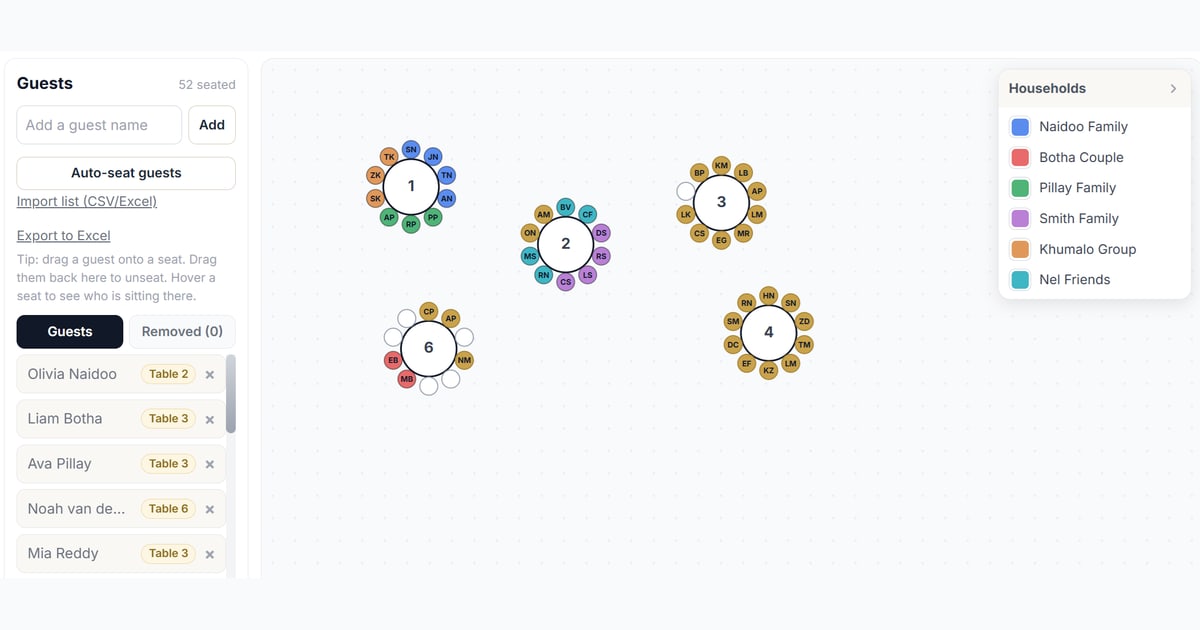
The secret to a fast seating chart is to stop thinking about individuals and start thinking about groups. Families, couples and friend circles want to sit together, so place whole groups at a time. If your guest list has that Household column, the planner can auto seat everyone with families kept together and each group shown in its own colour, which makes gaps and mistakes obvious at a glance. From there you just nudge the odd person around.
Step 3: How many guests per table?
As a rough guide, round tables comfortably seat 8 to 10, and long banquet tables seat 8 to 12 or more depending on their length. Check with your venue, because their tables and the room size set the real limit. Leave a little breathing room rather than squeezing in an extra chair, especially near serving paths.
Round tables or long tables?
Long banquet tables have become the more popular look at weddings lately. They feel modern, they photograph beautifully with runners of greenery and candles, and they make a room feel full. Round tables are the classic choice and make conversation easy because everyone can see everyone. There is no wrong answer, so pick what suits your venue and style. The planner supports round, oval, long, square and head tables, and you can rotate and resize them to match your real floor plan.
The tricky guests
Every wedding has a few. Keep feuding relatives well apart, ideally at different tables facing different ways. Seat single friends together at a fun, lively table rather than pairing them off. Group children together near their parents, or set up a dedicated kids table if there are enough of them. And give older guests a comfortable spot with easy access to the exit and the bathrooms.
A DJ's tip: mind the speakers
Here is the one thing couples almost never plan for. A dance floor is loud, and the speakers that make it loud are usually near it. Do not seat your grandparents, or anyone with a hearing aid, right in front of the speakers. It turns dinner conversation into a shouting match and can genuinely spoil their evening.
Before you lock in your chart, ask your DJ where the speakers and dance floor will go in your reception. A good DJ will happily tell you, and often suggest the quieter corners. Then place your older and quieter tables away from the speakers, and your party crowd close to the dance floor. It is a five minute conversation that makes a real difference on the night. If you have booked me, just ask and I will map it out with you.
Step 4: Build it, then share it
Once the plan is in your head, the quickest way to make it real is to drag it into place. Open the free seating planner, add your tables, drop in your guests, and drag anyone who needs moving. When you are happy, export it to Excel with every guest and their table number so you can hand it to your venue, caterer and stationery designer. Nothing to install, nothing to pay, and it saves in your browser as you go.
A quick final checklist
- RSVPs are in and the headcount is final.
- Families and groups are seated together.
- Tables are not over filled.
- Feuding guests are apart, singles are together, kids are sorted.
- Older and quieter guests are away from the speakers.
- The head or sweetheart table is set for the two of you.
- Exported and shared with your venue and caterer.
Ready to seat everyone? Open the free wedding seating planner and have your chart done tonight.
Still looking for a wedding DJ in KZN who will help you get the details right? Get in touch or read our reception timeline guide.